2015年7月10日金曜日

スペインでsimを買う 通信方式と電波帯 ORANGE,VODAFONE 販売店位置

london では、nexus7 用に amazon.uk で3の sim を個人輸入したが、今回は、同じく nexus7 もしくは polaroid pigu 用に orange sim の現地調達を検討。
空港では混雑して買いにくいらしいので、市街地店頭で購入する。

実際にスペインでsimを買った話

到着初日、BCNからバルセロナ市街へは、aerobus。
到着バス停はカタルーニャ広場北東 Pl. Catalunya - Andana Central と決まっている。
https://www.google.co.jp/maps/place/Via+Laietana,+38,+08005+Barcelona,+%E3%82%B9%E3%83%9A%E3%82%A4%E3%83%B3/@41.3858884,2.1764487,17z/data=!3m1!4b1!4m2!3m1!1s0x12a4a2fa28f02c11:0xf3193711d19322c8
目的のorange storeは、ホテルのある旧市街への道中ではなく、すこし東に寄り道した、
 ORANGE STORE BARCELONA VIA LAIETANAC/ VIA LAETANA, 38
徒歩7分らしい。

もしくは
Passeig de Gràcia, 6 08007 Barcelona

☆ C/ DE LA PORTAFERRISSA, 18


バルセロナ エルプラット空港内であれば、Crystal Media Shop で買えるかも。


買う予定のsimのプランは、日本で言うところの旅行者向けのプリペイド。
3にもあったと思う。

VODAFONEなら、これか?

Lebaraなら、


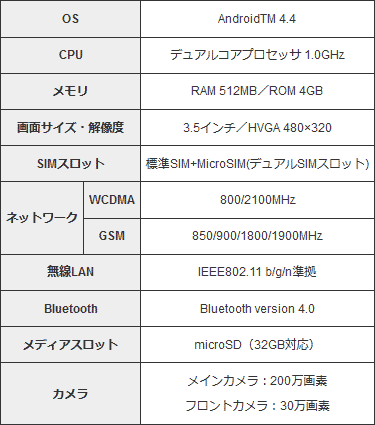
通信方式と電波帯
・piguの仕様
photo

で、スペインorangeのサービス

Orange España

From Wikipedia, the free encyclopedia
France Telecom España S.A.U.
Orange España
Sociedad Anónima Unipersonal
IndustryTelecommunications
PredecessorAmena
Founded1 August 2006
HeadquartersPozuelo de Alarcón, Spain
Area served
Nationwide
Key people
Jean-Marc Vignolles (CEO)
RevenueSteady € 4 billion (2012)[1]
ParentOrange S.A.
Websitewww.orange.es
France Telecom España S.A.U., more commonly known by its trade name of Orange España, is a mobile network operator in Spain. It was previously known as Amena (pleasant in an amusing way in Spanish) until 2005, when it was bought by France Télécom (now Orange S.A.). Its competitors are Movistar, Vodafone Spain and Yoigo.
Its legal headquarters are in Pozuelo de Alarcón, near Madrid.
Orange itself is not a Spanish word. Its equivalent is naranja, although in advertisements and announcements, Orange is pronounced [ˈoɾantʃ], closer to the English than the French pronunciation of the word.
Orange España is the third mobile phone provider of the four Spanish providers (Movistar, Vodafone, Orange and Yoigo), with 11 million customers. The company also offers TV and Internet (ADSL) services.
Orange offers GSM 900/1800 MHz (2G), UMTS 2.1Ghz (3G) HSDPA (3.5G) and now introducing LTE (4G) services. Its network radio access serves to the following Mobile Virtual network Operators (MVNOs, or "Operador Móvil Virtual" in Spanish): MasMovil, Happy Móvil, Carrefour Móvil, Jazztel Movil, Día Móvil and Simyo.


GSM900/1800MHzが使えるようなので、大丈夫だろう。2Gになるけど。
UMTS 2.1Ghz (3G)は、WCDMA2100MHzと同じ規格かもしれない。

店員さんが設定してくれることを期待して、スマホの言語をスペイン語にしておく。

また、この注意書きによると、
In order to enjoy a pay as you go service in Spain, the law requires that the operator register the name, surname, documentation with identity information and nationality of the person that signs up to the line.
スペインでペイ・アズ・ユー・ゴー(=プリペイド)サービスを利用するためには、回線を利用する者の姓名、身元及び国籍情報(パスポートか?)について、手続き受付者が登録する必要があると法律で決められている。

とのこと。パスポートとホテル所在情報も念の為印刷持参しておいたほうが無難。


ちなみに、カタルーニア広場〜旧市街付近までにある
ORANGE,VODAFONE販売店の位置↓
https://www.google.com/maps/d/edit?mid=zNl9LEhKkTuM.k07lMV4hVm3Y

バルセロナ市街からバルセロナ=エル・プラット空港(BCN)へ早朝バスで行く

バルセロナ=エル・プラット空港(BCN)早朝7:00発ブエリング航空でグラナダへ行く。
朝早くホテルを出て、なんとかして1時間前までにBCNにつきたい。
旅行2ヶ月前の現在時点での予定では、”バス”
実地はここ

ホテルは旧市街。
バス停はカタルーニャ広場北東 Pl. Catalunya - Andana Central
柿色のラインらしい。広場の南東500mくらいのところがホテルのある旧市街。
(初日の到着の際もこのバス停に着く。なので、初日のBCNで予め往復券を買っておこう)


A1に乗るとブエリング航空のT1に着くらしい。間違えないように。
http://www.aerobusbcn.com/en/terminal-1
空港到着ロビーからバス停までの動線の動画があって分かりやすい。
今回は方向が逆だが。

時刻表は、
朝5時台は、10分ごとにA1→T1がある。混雑していても、2〜3台目までに乗れれば、6時頃までには着くだろう。


vueling ブエリング 航空チケット購入

      バルセロナ(BCN) ←→ グラナダ(GRX)
2015−9−20  往路07:00発           復路19:00発
実地はここ

サイトは、
http://www.vueling.com/en
日本のシルバーウイークを狙っているのか、搭乗日前後の期間は、特に値付けが高い気がする。(実は、当方旅行が偶然メルセ−祭り期間と重なっていたことが原因と思われる)ブエリング航空のサイトで直接買えばよいが、コードシェア便だとイベリア航空のサイトからも購入できる(便数が少なく、都合の良い時間帯には結局本物のイベリア便がなかったりする)。申し込んだ便だと、イベリア航空の場合2名往復で約100€も高い。
ブエリングだと、クレジットカード手数料を取られたりするが、直接のほうがやはり良い。

いろいろ調べて、最安の2名バラバラ席でもいいかと思ったが、最安プランの場合、check-inが搭乗日の3日前になってやっと可能になると表示された。これだと、日本からのフライト中以降または、混雑で評判の悪いブエリング航空のカウンターでとなってしまう。sim入手まではネット環境のない状態、また、旅行中bording passも、もちろん印刷できる環境にはない。しかたないので、1名1フライト3.99€(ぐらいだったと思う)で2名続きのシート指定をした。すると、即web上でcheck-in可能となり、手続きをすすめるとboarding passが表示された。


搭乗までのシステム説明がイマイチだが、たぶん、、
・荷物を預けたり機内持ち込み有料となる場合は、この紙をもって通常カウンターではなく、専用カウンター  (special check-in desk)に行く。すると、通常の check-in で長い列に並ばされてイライラすることがない。
・手ぶらで乗るなら、この紙持って即、保安検査場→搭乗口。超簡単。
ということみたい。
最終ゲートで発券する、eチケットskipサービスのANA方式みたいなものか。
でも一応special check-in deskに行って、bordingpassの取り扱いをきいてみようか?
パスポート忘れずに。

ちなみに、vuelingのQ&A
https://www.vueling.com/en/vueling-services/check-in-online/questions-about-online-check-in

What do I have to do at the airport if I've already checked in online?
• • • • • • • • • • • • • • • • • • • • • • • • • • • • • • • • • • • • • • • • • • • • • • • • • • • • • • • • • • • • • • • • • • • • • • • • • • • • • • • • • • • • • • • • • • • • • • • • • • • • • • • • • •
If you have checked baggage:

If you have already checked in online for your flight and you're travelling with checked baggage, you must go the check-in desk with your luggage to get the baggage receipt, from where you can go directly to the security check. At some airports, such as Madrid and Barcelona, there is a special check-in desk for passengers who have checked in online and need to check in luggage, so the process will be much quicker. Don't forget that must be at the airport in sufficient time to the check in your baggage:

The check-in desks open 2 hours before departure and close 40 minutes before departure, except at the following airports:

All flights from Rome (Fiumicino) and St. Petersburg, where the check-in desks close 45 minutes before departure.
For all flights from Tel Aviv, Beirut, Algiers and Oran the check-in desks open 3 hours before departure and close 60 minutes before departure.
If you're travelling from Paris (Orly) to Tangiers, the check-in desks close 60 minutes before departure.
If you're travelling from Barcelona to Tel Aviv, the check-in desks close 60 minutes before departure.


If you're travelling with hand baggage but no luggage:

In this case you can go directly to the security check and then to the boarding gate without having to go to the check-in desk.

Don't forget you must be at the boarding gate at least 30 minutes before departure.

If you're travelling with hand luggage, remember it can weigh no more than 10 kg or be larger than 55x40x20 cm.


If I check in online, can I board without having to go to the check-in desk first?
• • • • • • • • • • • • • • • • • • • • • • • • • • • • • • • • • • • • • • • • • • • • • • • • • • • • • • • • • • • • • • • • • • • • • • • • • • • • • • • • • • • • • • • • • • • • • • • • • • • • • • • • • •
Yes, providing you have no bags to check in, you can go directly to the security check and then to the boarding gate.

Don't forget that if you have to check in a bag, so you must go to the check-in desk in sufficient time:

The check-in desks open 2 hours before departure and close 40 minutes before departure, except at the following airports:

All flights from Rome (Fiumicino) and St. Petersburg, where the check-in desks close 45 minutes before departure.
For all flights from Tel Aviv, Beirut, Algiers and Oran the check-in desks open 3 hours before departure and close 60 minutes before departure.
If you're travelling from Paris (Orly) to Tangiers, the check-in desks close 60 minutes before departure.
If you're travelling from Barcelona to Tel Aviv, the check-in desks close 60 minutes before departure.
At some airports, such as Madrid and Barcelona, there is a special check-in desk for passengers who have checked in online and need to check in luggage, so the process will be much quicker.


ticketmasterでアルハンブラ宮殿チケット購入

実地はここ

サイトは、
https://www.ticketmaster.es/en/
出発2ヶ月前だが、ナスリッド宮殿入場の人気時間帯には、もうかなり予約が入っている。
2015-9-20 11:30 の回に、残り3名のところ2名予約した。
名前入力のところで、middle nameを姓にしたら、エラーとなった。クレジット情報入力後だったので、不安だったが、しばらくすると予約人数が2名分回復していたので、ひと安心。
で、再度チャレンジ。今度は、ダミーで"1"を middle name に入力すると、最後まで正常に進んだ。
しかし、メールで予約完了の通知が来るはずだが、1日以上たっても、来ない。
当方、webmailだが、その昔、中国系通販サイトはwebmailに対応していなかったことを思い出した。同じ不具合だろうか?(追記:このときだめだったのはyahooメール。この失敗をもとに、バルセロナの観光地(ガウディ関係が主)では、web予約チケット購入での返信用メールアドレスはgmailにした。gmailだと何の問題もなく全て正常に返信があった。さすがgoogle、世界標準。)
まあ、予約完了時点の画面表示を印刷したし、その後も、サイトにログイン(会員登録してなくても、クレジットカード番号で可)すると、該当のID等が表示されるので、これと、そのクレジットカードも持っていけば大丈夫だろうと思う。が、referenceの数字の購入日付の並びが yymmdd だったり ddmmyyと混乱している。現地の発券マシンでの入力が少し不安。(”クレジットカードの挿入だけで、数字等の入力はない”との情報もあるが。)
(追記:チケットは、結局、宮殿受付窓口にて、この画面印刷とクレジットカード提示で発券)

早めに現地に到着するので、敷地内の他の場所を見て時間調節→指定時間にナスリッド宮殿へ。

2015年7月8日水曜日

ARC Welder on linuxmint LMDE2 colornote

ARC Welder をchrome にインストールし、colornoteが正常動作した。
colornoteは、android端末だけでしか使えなかったが、これで、自宅で win や linux で
作業中でも、ふと頭に浮かんでメモしておきたいことをどの端末、pcででもcolornoteに記録でき、日中職場に持ち込むスマホで確認可となった。
今までは、win or linux → android と、どうしても同期させたい状況の場合は、googledriveを使ってtext受け渡しか、使いにくいgooglekeepをいやいや使っていたが、これからは、winでもlinuxでも、chome or chromium 上でcolornoteの使用が可に。便利になったものだ。
さすがに、AVVAはダメだったけど。

2015年7月3日金曜日

崩れゆく世界生き延びる知恵

2015-07
副島 隆彦 (著), 佐藤 優  (著)
日本文芸社 (2015/5/27)
ISBN-10: 4537261153

反知性主義
官僚はオルガリヒ


2015年7月1日水曜日

inserting leap second うるう秒 23:59:60 が挿入された記念

2台あるraspiサーバ両方ともに、うるう秒 23:59:60が挿入されていたので、記念に。

サーバ1 [1448545.917280] Clock: inserting leap second 23:59:60 UTC
サーバ2 [564717.476130] Clock: inserting leap second 23:59:60 UTC
特に異常は発生していない。


2015年6月28日日曜日

2015-6のmy畑 ジャガイモ半分収穫

早く収穫しないと、「モグラにやられるぞ」とのことなで、
とりあえず半分だけ収穫
相変わらず、大きさが不揃い


2015-6のmy畑 黒大豆移植

黒豆発芽後1週間。
畝を整えて、
移植完成


2015年6月20日土曜日

GenymotionでA V V A 対策

フリーライダーは90日でfreeplan転落らしいので対策。

【その手口】
・win7にGenymotionとOracle VM VertualBox をインストール
・virtual device は Google Galaxy Nexus 4-4.3-API 18 を選択(これが無難)
・Genymotion-ARM-Translation_v1.1.zip をダウンロード
・gapps-jb-20130813-signed.zip をダウンロード

・Google Galaxy Nexus 4-4.3-API 18  を起動。起動不能エラー対策は適当にググる
・Genymotion-ARM-Translation_v1.1.zip→gapps-jb-20130813-signed.zip の順に
 ドラッグ&ドロップする。
 エラーがでても、再度起動させがら根気よく続ける。
・幾度かトライ後 googleplay が表示される。

・virtual deviceには、適切な?アカウントを登録。
 (ま、期限がくれば、再度適切なことをする。。。virtualなので幾らでも。)
・"目的のアプリ"をインストール。
・着信音、操作音等は出ない設定とする。

・win7に内部音声だけをwavでヤレるフリーソフトをインストール。

・あとは適宜

【その他】
・Genymotionnにはlinux版他もあるが、当方の環境(linuxmint LMDE2)では、
 どの virtual device と gapps-* の組み合わせでも、googleplayの正常インストール
 までたどり着かなかった。
・win7でも似た状況ではあったが、上記組み合わせであれば、エラーが数度
 現れるものの、"目的のアプリ"の正常起動まで到達した。
・1つづつやるのも良し、全部やって切り分けるもよし。
・ヤッてる最中は、関係ない操作や他デバイスでの通信など、雑音が発生する
 可能性のある操作は極力控える。(それでなくてもプチ音が結構発生するのが難点)
・その昔、LPやFMをカセットデッキでナニした時の懐かしい気分にひたれます。
 しかし、この方法だと、他にもいろいろ楽しい応用が効きそうだなぁ。
・90日間というのは、今だけのバーゲンだろう。ペイする数のユーザーを獲得したら、
 30日とか7日とか、あるいはこの特典そのものを無しにするのかもね。


2015-6のmy畑 黒大豆発芽

播種後1周間で黒大豆が発芽。篠山の種も。


2015年6月15日月曜日

X200にTranscend SSD & LMDE2 Besty MATE (64-bit)

raspiのHDDが昇天したので、X200のSATAHDDをraspiに移植
X200にはSSDとした。
Transcend SSD 64GB 2.5インチ SATA3 6Gb/s MLC
TS64GSSD370S
AMAZON にて¥5,300

LMDE2 Besty MATE (64-bit)をインストール

download mirrorは↓で、ダウンロード時間は約3h
http://ftp.tku.edu.tw/Linux/LinuxMint/linuxmint-iso
//debian/lmde-2-201503-mate-64bit.iso


Transcend SSD 64GB 2.5インチ TS64GSSD370S

¥ 5,300

2015年6月14日日曜日

BSW13K08HSV → C270 入れ替え ddでバックアップ

オークションでC270を入手(¥1000くらい)したので、
ボロのBSW13K08HSVをC270に入れ替え
BSW13K08HSV


C270

やはりC270の画質は、極めてクリアで上質。この価格帯では最高品質。
BSW13K08HSVとは比べ物にならない。

raspiの設定を少変更したので、microSDカードをまるごとバックアップ。
 dd if=/dev/sdb of=/mnt/20150614.img bs=4M

2015年6月13日土曜日

2015-6のmy畑 サツマイモ

サツマイモも順調
収穫は4ヶ月後だそうだから、9月5日か?

2015-6のmy畑 黒大豆播種

篠山の種を50粒ほど入手。
いままでの種も10粒ほど播種。
畝も再度人力耕うんと肥料まき。


2015年6月12日金曜日

Chromium に Flash Player

 LMDE2 “Betsy” MATE 版 にアップグレードしたら、Chromium で Flash が
使用不能になった。

http://qiita.com/cm3/items/ec4b6b8dce63bc107510
↑を参考に解決

apt-get install pepperflashplugin-nonfree
update-pepperflashplugin-nonfree --install

2015年6月7日日曜日

丹波市 市島そば、京都美山旅行

丹波市 市島町 「そばんち」


 真ん中は、そば米のおじや 美味


美山町大野地区樫原にある石田家住宅


美山かやぶき美術館・郷土資料館
 当日は撮影で入場不可であった。(仲代達也さん?)


美山町観光協会 美山のめぐみ牛乳工房


美山町 かやぶきの里北村


「トチ」の名刺入れを購入

関連記事